
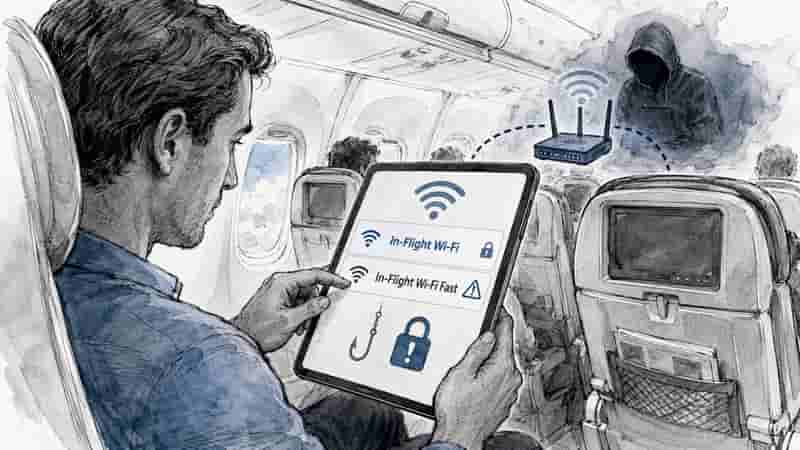
Fake Wi-Fi has long been one of travel’s quieter traps. It looks harmless, costs nothing and often appears at the exact moment a traveller wants to check a booking, message home or finish some work.
Yet an unauthorised network aboard Delta Air Lines Flight 591 has put the risk firmly back on the travel industry’s radar.
The Las Vegas-to-Atlanta service on 10 August 2026 briefly had an unauthorised wireless network appear under the name “Delta Wifi Fast”.
Delta said the network was not provided, operated or supplied by the airline. The carrier also said its systems were not hacked, flight safety was never in question and no aircraft operating systems were affected. Federal authorities were aware of the incident, and they were investigating.
And therein lies the rub. The aircraft itself may have been perfectly safe, but passengers tapping hopefully at their phones faced a very different sort of turbulence.
What is an evil twin attack?
The episode matters because fake Wi-Fi can be remarkably convincing.
A rogue network can copy the name of an airline, airport, hotel, café or lounge. To a tired traveller with a boarding call in one ear, carry-on luggage in the other and 12 per cent battery remaining, it may look perfectly genuine.
Cyber-security specialists call this an “evil twin” attack. The US Cybersecurity and Infrastructure Security Agency describes the technique as an attacker setting up a wireless access point that impersonates a legitimate public network.
As the expert commentary supplied to Global Travel Media explains:
“An evil twin attack is when hackers create fake Wi-Fi networks with the goal of stealing sensitive information from people, or exploiting known vulnerabilities present on victim devices. The fake networks often have a very similar (or identical) name to the legitimate network, which was the case here.”
The important point is that connecting to a rogue hotspot does not automatically mean every password, photograph and banking detail on a device has sailed off into cyberspace.
Modern internet encryption provides far greater protection than travellers had in public Wi-Fi’s earlier days.
The US Federal Trade Commission says most websites now use encryption, meaning information sent between the user and the website is generally protected from casual interception.
But encryption does not magically turn a fake hotspot into a trustworthy one.
Phishing remains the bigger trap
A criminal controlling a rogue network may try to direct users towards a false login screen, copied airline portal, social media sign-in page, bank login or another phishing site.
And sometimes the easiest way to steal information is not to crack sophisticated encryption at all. It is simply to persuade somebody to type the information into the wrong box.
The supplied expert commentary puts that danger plainly:
“The risk here is that the hacker may attempt to redirect the victim to a phishing website for instance, in this case, it may have been a fake Delta login page asking for personal data like name, email, address, etc.”
Reports surrounding the Delta incident indicated that the suspicious network appeared shortly after Las Vegas hosted the DEF CON cyber-security conference. However, the identity, motivation and precise technical actions of whoever created the network had not been conclusively established publicly at the time of writing.
That distinction matters. Suspicion is not proof, particularly when federal authorities are still asking questions.
Australian travellers should take note
For Australians heading through airports, hotel lobbies, airline lounges and cafés, the advice from the Australian Signals Directorate’s Australian Cyber Security Centre is refreshingly uncomplicated.
ASD’s ACSC warns that public Wi-Fi hotspots can attract cybercriminals because anyone can create a hotspot and copy a legitimate network’s name.
Its advice includes checking the exact hotspot name against venue signage or directly with staff, disabling automatic connection features and making devices “forget” the network once it is no longer required. Where possible, travellers should favour a trusted mobile service or personal hotspot.
Good old-fashioned verification, it seems, remains remarkably difficult for technology to improve upon.
Connected to fake Wi-Fi? What happens next?
The seriousness of the situation depends heavily on what a traveller did after connecting.
If someone entered a password, payment information or personal details into an unfamiliar page, downloaded a file, approved an unexpected prompt or ignored browser security warnings, the risk becomes substantially greater.
Change passwords believed to have been exposed promptly. Check the affected device for malware, and enable multi-factor authentication wherever available.
If banking or card information was entered into a suspicious page, the traveller should contact the financial institution promptly and follow its fraud and account-security procedures.
But spotting a questionable network in the Wi-Fi menu, or briefly connecting before disconnecting without providing information, is a very different proposition.
As the supplied expert commentary states:
“However, if a user just connected and disconnected to the Wi-Fi without entering any details or clicking suspicious links, they should be fine.”
That should calm some nerves. It should not encourage complacency.
Travel agents have a role, too
There is also a useful lesson here for travel agents, travel advisers and corporate travel managers.
Cyber safety deserves a place alongside passports, visas, travel insurance and emergency contacts in the modern pre-departure briefing.
A corporate traveller carrying a laptop may carry confidential documents, business credentials, customer information, and access to company systems. In value terms, that laptop could contain considerably more than anything packed into the overhead locker.
Travellers should confirm the correct network name, switch off auto-join, keep their operating systems and browsers updated, use multi-factor authentication and avoid sensitive financial activity over unknown networks.
ASD also recommends avoiding public Wi-Fi where practical or using a VPN when appropriate while travelling.
A VPN can add useful protection to internet traffic, but one important caveat remains: no VPN can make a fraudulent login page genuine.
Free Wi-Fi should never mean free access to you
The Delta episode is a timely warning because digital scams increasingly exploit ordinary behaviour.
Travellers want connectivity. Airlines, airports and hotels provide it. Criminals know it.
There is nothing inherently alarming about joining Wi-Fi while travelling. The danger begins when convenience overrides caution.
Free Wi-Fi, after all, is a convenience, not a character reference.
If a network looks familiar but behaves strangely, asks for unexpected personal information or presents unusual security warnings, do not reward it with your password.
For travellers in 2026, the safest connection remains the one they can verify.
Useful Traveller Resources
Australian Cyber Security Centre – Connecting to Public Wi-Fi and Hotspots
Australian Cyber Security Centre – Security Tips for Travelling
US Federal Trade Commission – Are Public Wi-Fi Networks Safe?
US CISA – Securing Wireless Networks
By: Susan Ng – © 2026.
Read Time: 4 minutes.
Author Bio:
 With the polish of an international hotel professional and the instincts of a born storyteller, Susan Ng learned hospitality where it truly lives behind reception desks, in banquet halls, beside linen carts. She understands that excellence isn’t announced; it’s felt, in the small, quiet gestures that linger long after checkout.
Away from the bustle, her curiosity found a new front desk: the blank page. Her blog, candid and gently wry, drew readers who recognised truth when they saw it. She wrote about grace and imperfection with the steady eye of someone who had lived both.
Today, at Global Travel Media, Susan brings that same warmth and insight to her stories. Expect writing that is polished, generous, and reassuring like the perfect welcome after a long journey.